
Introduction
A private endpoint can be approved and show as connected, but an application can still fail to reach the Azure service. DNS is one of the first things I check. The client must resolve the service name to the private endpoint IP address, and it must also have a network path to that address.
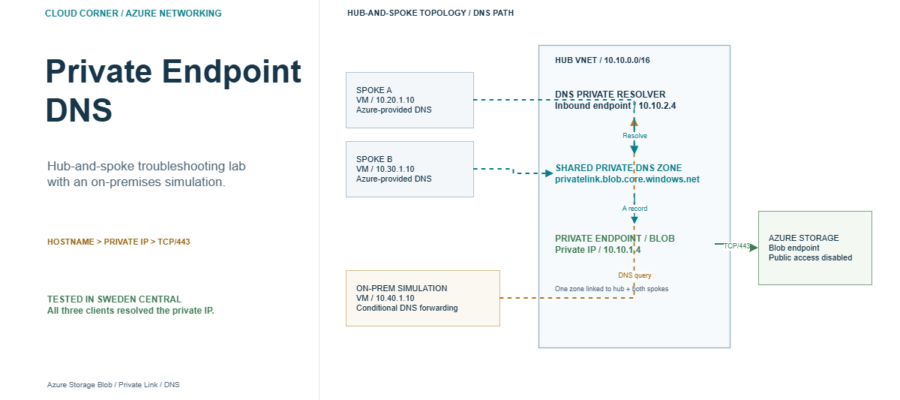
In this post, I use an Azure Storage account as an example. I place its private endpoint in a hub virtual network, connect two spoke networks, and check name resolution from both spokes. I also simulate an on-premises client in a separate VNet and forward its Storage DNS queries through Azure DNS Private Resolver. This is a troubleshooting lab, not a complete production network design.
What the lab should prove
From each client, the normal Storage hostname, for example mystorageaccount.blob.core.windows.net, should resolve through its DNS chain to the private IP address of the endpoint. The same hostname should work from the simulated on-premises client after its conditional DNS route forwards the query to Azure.
DNS resolution and network access are separate checks. A private IP in the DNS result does not prove that the private endpoint connection is approved, that routes and security rules allow traffic, or that the caller has permission to access the blob data.
Lab topology
- Hub VNet: Contains the Storage private endpoint and Azure DNS Private Resolver. The resolver has an inbound endpoint for DNS queries from on-premises.
- Spoke A and Spoke B: Peered with the hub. Each has a test VM using Azure-provided DNS.
- Private DNS zone: One shared zone named
privatelink.blob.core.windows.net, linked to the hub and both spokes. - On-premises simulation: A Linux client VM in a separate VNet peered with the hub.
systemd-resolvedforwards the Storage DNS suffix to the resolver’s inbound endpoint. This does not test a real on-premises DNS server, VPN, or ExpressRoute connection.
The private endpoint DNS zone group manages the Storage endpoint record in the private zone. The VNet links let Azure DNS use that zone for clients in the linked networks. The simulated client forwards the service’s public DNS suffix, blob.core.windows.net, rather than only the privatelink suffix.
Lab topology at a glance
| Client network | DNS path | Private data path |
|---|---|---|
| Spoke A 10.20.0.0/16 Azure-provided DNS |
Azure DNS → shared private DNS zone | VNet peering → hub private endpoint 10.10.1.4 → Blob |
| Spoke B 10.30.0.0/16 Azure-provided DNS |
Azure DNS → shared private DNS zone | VNet peering → hub private endpoint 10.10.1.4 → Blob |
| On-prem simulation 10.40.0.0/16 Linux client VM |
Conditional forward → resolver inbound 10.10.2.4 → private DNS zone | VNet peering → hub private endpoint 10.10.1.4 → Blob |
The private DNS zone, privatelink.blob.core.windows.net, is linked to the hub and both spoke VNets. The on-premises simulation is a separate peered VNet, not a real VPN or ExpressRoute connection.
Before we start
You need an Azure subscription and permission to create a Storage account, private endpoint, virtual networks, private DNS zone, and DNS Private Resolver. This lab was tested on 11 November 2026 in Sweden Central with three Ubuntu 24.04 test VMs. The on-premises path uses an isolated simulation VNet, not a real corporate network.
Use isolated resources and check regional availability and cost before deployment. The test VMs have private IP addresses only. Azure Run Command was used to run the DNS and TCP checks without opening SSH or adding public IP addresses.
Create the Storage private endpoint
- Create a Storage account for the lab and enable the Blob service.
- In the Storage account’s networking settings, create a private endpoint for the Blob subresource in the hub VNet.
- Approve the private endpoint connection if approval is required. Confirm its connection state is approved.
- Integrate the endpoint with the existing
privatelink.blob.core.windows.netprivate DNS zone by using a private DNS zone group. Do not create a separate zone with the same name for each VNet. - Check that the zone contains an A record for the Storage account that points to the private endpoint’s IP address.
Link the private zone to the virtual networks
- Open the private DNS zone and add a virtual network link for the hub VNet.
- Add links for Spoke A and Spoke B. Use the same private DNS zone so all three VNets can resolve the Storage record.
- Keep the test VMs on Azure-provided DNS for this part of the lab. If a VNet uses custom DNS servers, those servers need a separate forwarding design.
- Wait for the configuration to apply, then test from a VM in each spoke.
VNet peering provides network connectivity, but it does not automatically make a private DNS zone visible to every peered VNet. The zone links are an explicit part of this design.
Test from each spoke
Run these commands from a Linux VM in each spoke. Replace the example hostname with your Storage account’s Blob hostname.
storageHost="mystorageaccount.blob.core.windows.net"
getent ahostsv4 "$storageHost"
timeout 5 bash -c "</dev/tcp/$storageHost/443" && echo TCP443_OK || echo TCP443_FAILED
Tested on 11 November 2026: both spokes resolved the Blob hostname to 10.10.1.4, the private endpoint IP in this lab, and returned TCP443_OK. The DNS response included the private-link hostname. TCP/443 confirms network reachability only; it does not authenticate to Storage or prove that a blob can be read.
Simulate on-premises DNS resolution
- Deploy Azure DNS Private Resolver in the hub VNet and create an inbound endpoint in a dedicated subnet delegated to
Microsoft.Network/dnsResolvers. - Create a separate VNet for the on-premises simulation and peer it with the hub. This substitutes for a real VPN or ExpressRoute link in this lab.
- On the Linux client VM, configure
systemd-resolvedwith the resolver inbound endpoint IP and the conditional suffixblob.core.windows.net. In this lab, the resolver IP is10.10.2.4. - Query the normal Storage hostname from the client and check that it resolves to the private endpoint IP.
The private DNS zone is linked to the hub VNet, where the resolver is deployed. The inbound endpoint handles queries entering Azure. An outbound endpoint and forwarding ruleset are for a different direction: forwarding queries from Azure to other DNS servers.
Tested on 11 November 2026: the simulated client also resolved the Storage hostname to 10.10.1.4 and returned TCP443_OK. This validates the Azure-to-Azure simulation only; test forwarding from a real on-premises DNS server over VPN or ExpressRoute separately.
DNS resolution and connection flow
| Step | What happens | What to verify |
|---|---|---|
| 1 | Client requests storage.blob.core.windows.net |
Keep the normal service hostname in the client configuration. |
| 2 | Spoke uses Azure DNS; the simulation conditionally forwards to 10.10.2.4 |
Forward the service suffix blob.core.windows.net. |
| 3 | The shared private zone returns the endpoint address | The final A record is the private IP 10.10.1.4. |
| 4 | Client opens TCP/443 to the private endpoint | A successful connection confirms network reachability, not data access. |
| 5 | Storage evaluates the request | Authentication and Blob data permissions are checked separately. |
Troubleshooting checklist
- The name resolves to a public IP: Check that the private endpoint is approved, its DNS zone group exists, the expected A record is present, and the client’s VNet can use the private DNS zone.
- The name returns NXDOMAIN: Check the zone name, A record, and VNet links. Confirm that the client is querying the expected DNS server.
- One spoke works but the other does not: Compare the VNet links and DNS settings for both spokes. Do not assume peering alone shares private DNS records.
- Azure works but on-premises does not: Check the real VPN or ExpressRoute route, DNS reachability to the inbound endpoint, and the conditional forwarder suffix. It should use
blob.core.windows.net. The lab simulation does not validate a production on-premises DNS server. - The name resolves to the private IP, but TCP/443 fails: Check the endpoint connection state, hub-and-spoke routes, NSGs, firewalls, and any network appliances in the path.
- TCP/443 succeeds but a Storage request is denied: Check Storage data-plane authorization and the service’s network settings. DNS and TCP reachability do not grant data access.
A public DNS CNAME in the response can be expected as part of the resolution chain. Seeing a public CNAME does not by itself mean the client is using the public endpoint. Check the final A record and the connection destination.
Cleanup and cost
After testing, remove the test VMs, private endpoint, Storage account, DNS Private Resolver, and any lab-only networking resources. Check which resources are shared before deleting a resource group. A DNS Private Resolver and running VMs can create charges while the lab is left in place, so review current pricing and remove resources you no longer need.
Conclusion
When a private endpoint connection fails, check name resolution and network reachability separately. In a hub-and-spoke design, use one shared private DNS zone and link it to the VNets whose clients need to resolve the endpoint. For on-premises clients, forward the service DNS suffix to an Azure DNS Private Resolver inbound endpoint, then verify the private address and the network path.
References
- Azure Private Endpoint DNS Integration Scenarios
- Azure Private Endpoint private DNS zone values
- Azure DNS Private Resolver overview
- Virtual network links for Azure DNS Private Zones
- Hub-spoke network topology in Azure

Pantelis Apostolidis is a Sr. Specialist, Azure at Microsoft and a former Microsoft Azure MVP. For the last 20 years, Pantelis has been involved to major cloud projects in Greece and abroad, helping companies to adopt and deploy cloud technologies, driving business value. He is entitled to a lot of Microsoft Expert Certifications, demonstrating his proven experience in delivering high quality solutions. He is an author, blogger and he is acting as a spokesperson for conferences, workshops and webinars. He is also an active member of several communities as a moderator in azureheads.gr and autoexec.gr. Follow him on Twitter @papostolidis.